 Free & open source
OPE
Out Past Engineering. A free, open-source Mac and Windows app for vibe coders that shows every version your AI coder builds as a green box, so you and your AI coder work together as a healthy ecosystem. And when you want to, it teaches you to code on your own project.
The one idea
More and more people build software by talking to an AI. You ask, it writes, the app grows, and after a few rounds you have something that runs and no idea what is inside it. Which folders did the last change touch? Which files? Which exact lines? When something breaks, you cannot point at the thing that broke it. You are shipping code you have never seen.
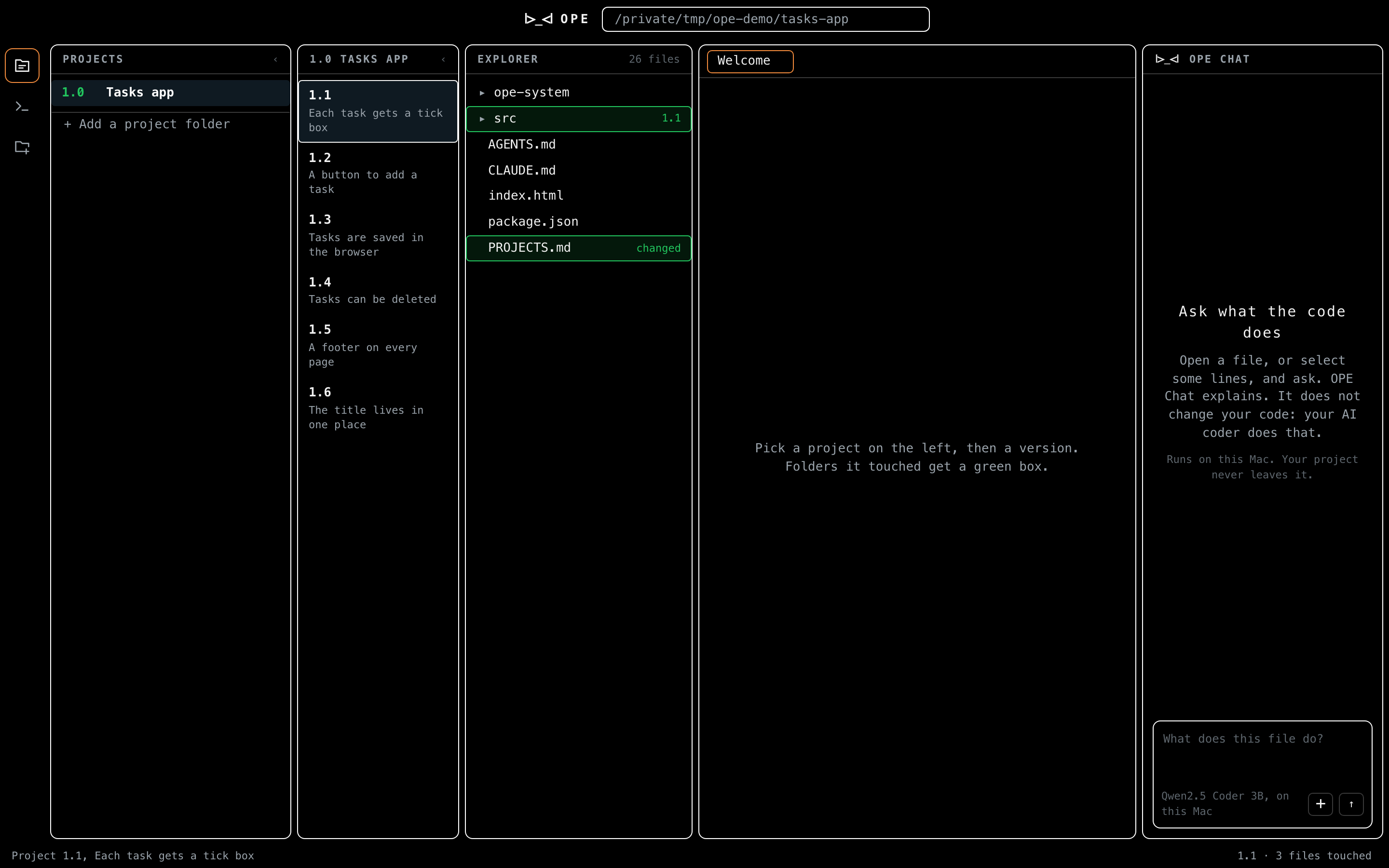
OPE closes that gap. It opens your project, reads its history version by version, and boxes in green exactly what each version changed, folder to file to line, so the black box becomes something you can look at and fix. It is not a chat window and not another AI. It is the pair of eyes for the code the AI wrote.
How it works
OPE sits on top of the one record every project already keeps: its git history. It turns that record into something you can read at a glance.
Versions come from tags
Each version, 1.0, 1.1, and on, is a git tag. OPE reads the tags and lays the versions out in order, so a project's whole life is a list you can step through instead of a wall of commits.
What a version touched, boxed in green
Pick a version and OPE diffs it against the one before it, then paints the result onto the project tree: the folders that version reached, the files inside them it changed, and the lines it added or edited, each boxed in green. You see the blast radius of a single version without reading a single raw diff.
Fix it inline, in a real editor
The code shows in a full Monaco editor, the same engine that powers VS Code, bundled inside the app so it works with no internet. When you find the line the AI got wrong, you edit it right there and press save, and OPE writes the change straight back to the real file on disk. It watches the folder, so the moment the AI or you change anything, the view updates.
Learning while building
OPE has three modes. Building is everything above. Learning while building turns OPE into a teacher that uses your own app as the textbook, from someone who has barely touched a laptop up to someone who can review an AI's code and reject it. Learn only is the same course with no project at all: OPE makes a course folder, opens it, and teaches from there.
Your AI coder leaves work for you
The AI still writes the full, working code. OPE writes one file into the project that tells it where you are, and from then on it tags one to three small pieces of what it writes, each with its own test. OPE cuts a piece out, you write it back, and it only counts when the test passes. Explaining a piece works the same way: your answer goes into a file and your AI coder grades it, with the reasons.
Eight parts, 113 milestones
Every project in the world is made of the same things: values, decisions, loops, functions, data, errors. OPE puts them in order across eight parts, 113 milestones, Computer, Reader, Tweaker, Writer, Builder, Debugger, Designer and Elite. The list is fixed; the practice comes from your code. When your project has nothing at your level that day, a bank of 114 tested tasks fills the gap.
Rules that keep it honest
Nothing too hard reaches you: the AI says how hard a piece is, OPE's own rules check the code, and the harder of the two wins. No jumping: every part opens with a door test, and passing it passes the whole part. From Part 4 the AI stops writing code for you, and you write it yourself. Just do it for me is always there, and every skip is remembered and brought back until you pass it for real. Tests run on your machine and grading uses the AI coder you already have, so learning costs nothing.
Local only, no account, no server
OPE never sends your code anywhere. There is no sign in, no cloud, no server in the middle. It is a native desktop shell around a local web view: on Mac the shell is written in Swift, on Windows it installs for you alone with no admin, and either way it opens the folder you point it at, and everything, the git reads, the diffs, the editor, happens on your machine. Your project stays your project.
It ships for Mac and for Windows. Open it, choose a project, and you are looking at your versions in seconds. The Mac build is signed and notarized by Apple.
From the Out Past family
OPE stands for Out Past Engineering. It shares the same face mark and the same instinct as Out Past: build the honest, local, no-nonsense version of a tool, put the code in the open, and let people run it themselves. Out Past is about seeing and holding a plan on your phone. OPE is about seeing what your AI actually built. Same family, same principle, different problem.
Judgment, and what is honest about it
It reads a record, it does not replace review. OPE makes a version legible. It does not judge whether the code is good. It shows you where to look, faster than any diff viewer I have used, and leaves the thinking to you.
Folder and file are exact, line-level is being sharpened. The folder and file boxes come straight from the version diff and are exact. The line highlighting leans on git blame today, which attributes a line to the last commit that touched it rather than strictly to the version, so the line view is being moved onto the same diff-against-parent basis as the rest. It is written down because the honest account beats the flattering one.
Small on purpose. The app is under four thousand lines of my own code around a bundled editor, about half of it the teacher and its tested practice bank. It does its job locally, and it is open so you can check every claim on this page against the source.
Where it honestly stands
OPE is finished enough to use and free to take. It is a working Mac and Windows app, open source under the MIT license, with the full code public on GitHub. It is here because it is a real, complete product I built end to end, and because it answers a problem that did not exist two years ago: how do you see the app your AI built.